[ Japanese ]
Help
Summary
- From the Hokkaido University Library E-Journals page, you can access more than 20,000 electronic journals and books (SourceOECD Books etc.) which are available in Hokkaido University.
- Paper journals have been converted to electronic format and are available via computer. They are called e-journals (or e-books in the case of books).
- E-journals and e-books are available from any computer connected to the university network 24 hours a day.
How to Search for an E-Journal
You can find the e-journal you want by title searching or by checking the alphabetically ordered English and phonetically ordered Japanese lists on the Hokkaido University Library E-Journals page.
The following explains how to find an e-journal.

(1) Search
- You can search for an e-journal by title or by ISSN.
| Search by title. |
Match by exact titles |
| The title which starts with the words. |
Match start of titles |
| The title which includes every word |
Enter more than one word |
| Asterisk (*) can be used as wildcard |
| ISSN |
Enter ISSN. Hyphens are not necessary. |
| Search by abbrev. title. |
Enter abbrev. title. |
(2) Alphabetically ordered English and phonetically ordered Japanese lists
- You can find the e-journal you want by searching for the first letter of its title from the alphabetically ordered English and phonetically ordered Japanese lists.
(3) Subject list
- You can find the e-journal you want from the subject list.
※If you get too many search results, we recommend that you add criteria and search again, or move the cursor over the page numbers to confirm which first title can be found on which pages.
Available issues
- Available issues of an e-journal are shown on the right side. In the example below, issues of the e-journal from 1997 to the present are available.

Cautions
- Most of the e-journals in the university are open access, but some of them require your ID and password. E-journals which require your ID and password can be identified by the note, “ID/Password required” in the title information field. You can open the page, “Obtaining your ID and passwords” by clicking the note.
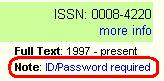
- You can also open the “Obtaining ID and passwords” page from here. →http://ambitious.lib.hokudai.ac.jp/ej/idpw.htm(Campus Only)
Access to Articles
When you can’t find an e-journal you want
- Even though you can’t find the e-journal you want, you can check if there is a paper version available in the university by clicking “Search university books (OPAC).”

Accessing E-Journals from Database
- Most of the databases allow you to access e-journals from the search results.
- For details on databases and their usage, please click here.
| Last updated Nov. 1, 2007. Information Management Division |
Inquiries |